


Kitchen Stories: Recipes
4.1718.00 Reviews
App Specs
- Version
- 27.1.5
- Updated On
- License
- Free
- Downloads
- 1,000,000+
- Developer
- Kitchen Stories
- Categories
- Food & Drink
- Platform
- Android
Screenshots



 Analysis by AppCompare
Ever found yourself standing in the kitchen, staring at a bunch of ingredients, and wondering what on earth you could whip up? Well, I’ve been there too, and that’s where Kitchen Stories: Recipes comes into play. This app is like having a culinary mentor right in your pocket, ready to guide you through every step of the cooking process. If you’re someone who loves experimenting with new dishes or just needs a little inspiration in the kitchen, this app might just become your new best friend.
Choosing a recipe tool that fits your routine
For me, the useful question is not simply whether an app has recipes, but whether it helps me get from “what should I make?” to a meal I can actually manage tonight. Kitchen Stories is a cooking app from Kitchen Stories, and its emphasis on recipe browsing, visual guidance, and keeping ingredients together makes it most appealing when I want a little direction rather than an enormous blank search box.
It is free to download, with optional in-app purchases listed from $7.99 to $79.99 per item. That makes it easy to try before deciding whether any paid extras are worthwhile for your own habits. The app is rated for Everyone, and its current version is 27.1.5; the stated minimum operating system is 8.0. I would still check that the version available to your device is compatible before planning to rely on it in the kitchen.
The audience figures offer some context, but they are not a substitute for fit: it has more than a million installs, around 34,000 ratings, and an average rating of 4.1. I read that as a sign that it has found a substantial cooking audience, while remembering that ratings cannot tell me whether a particular recipe suits my pantry, schedule, or taste.
Where the guided approach earns its place
The strongest case for using it is the moment when a recipe feels unfamiliar. A written instruction can say “fold gently” or “cook until golden,” but that wording may not help much if I have never done it before. Kitchen Stories pairs directions with photos and videos, giving me a visual reference as I work. That is useful not only for beginners: even an experienced home cook can appreciate a quick look at what a stage is meant to resemble.
I would use that guidance selectively rather than treating every recipe as a video lesson. Before starting, I like to skim the whole method, check the ingredient list, and notice any step that needs attention while something else cooks. Then I can keep the phone nearby for the parts where a visual cue matters. This small habit reduces the chance of discovering halfway through that I missed an important instruction.
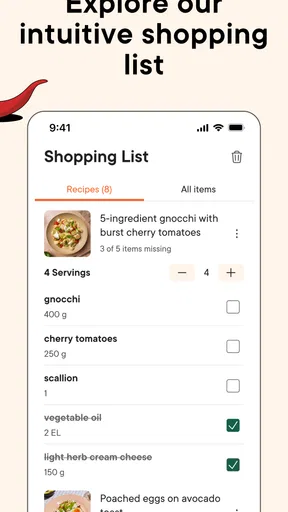
The shopping list also suits a practical workflow. If I choose a few recipes before heading out, adding their ingredients to a shared list in the app is more reliable than trying to remember each item in the aisle. I would review that list before shopping, though: ingredients already at home, pantry staples, and quantities needed for several meals can make a raw list less useful unless I check it against what I actually have.
Worth Reading Before You Choose

EA SPORTS FC Mobile 26 Is a Bigger Football Game, but It Takes Time

Flipboard Shows What News Apps Must Do Beyond the Feed

Switching to Android Auto Means Rethinking Your Driving Routine

Google Calendar Makes a Crowded Week Easier to Manage

Ludo King Makes the Most of the Minutes Between Plans

Baby Panda World Brings Quick Play to Modern Phones, but Its Game Library Feels Busy
A realistic weeknight use
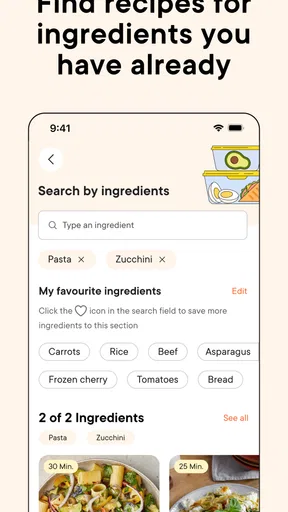
Picture a weekday evening: I have a few vegetables, a packet of pasta, and little energy to invent a meal from scratch. I can search for something that makes use of ingredients I already have, compare the suggested recipes, and choose one whose steps and apparent effort suit the time I have. If a key ingredient is missing, I can add it to the shopping list rather than abandoning the idea and starting over.
That workflow is most helpful when I am flexible about the exact dish. It is less decisive if I need to use up a very specific combination of leftovers, meet several strict dietary requirements, or cook for someone with allergies. In those cases, I would carefully inspect every ingredient and instruction instead of assuming a broad search filter guarantees suitability. Recipe discovery can narrow choices; it cannot make that judgment for me.
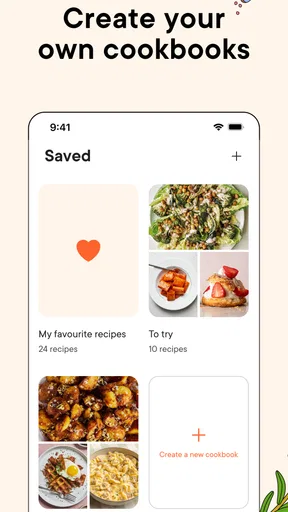
For meal planning, I would save promising recipes as I find them, then choose a manageable set for the coming days. The benefit is not simply having more options: it is being able to return to a recipe without repeating the same search. A useful trade-off is that collecting too many possibilities can become its own clutter. I find it better to save recipes I genuinely expect to cook and remove ones that no longer fit my routine.
Getting Started with Kitchen Stories
First things first, let’s talk about getting started. Once you download the app, you’re greeted with a clean and user-friendly interface. I appreciate how intuitive it is, making it easy to navigate even if you’re not tech-savvy. You can dive right into exploring recipes or create an account to save your favorites and customize your experience. The sign-up process is straightforward, and trust me, it’s worth it to have everything tailored to your tastes.
A World of Recipes at Your Fingertips
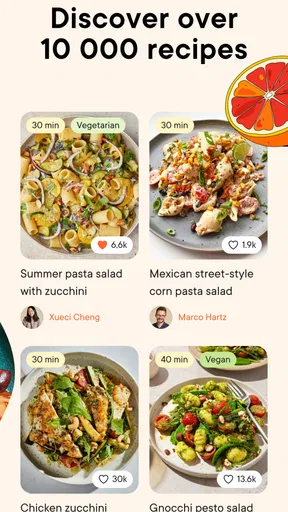
One of the standout features of Kitchen Stories is its vast collection of recipes. We’re talking hundreds of dishes from different cuisines around the world. Whether you’re in the mood for a classic Italian pasta or want to try your hand at a spicy Thai curry, you’ll find it here. The search function is robust, allowing you to filter by ingredients, difficulty level, or even dietary preferences. It’s like having a global cookbook, minus the hefty price tag.
What I love the most is the variety. You’re not just limited to main courses; there are appetizers, desserts, and everything in between. Plus, the app keeps updating with new recipes, so there’s always something fresh to try out.
Cooking Made Easy with Step-by-Step Guides
If you’re anything like me, sometimes the thought of trying a new recipe can be a bit daunting. But with Kitchen Stories, they’ve got you covered. Each recipe comes with detailed step-by-step instructions, complete with photos and videos. This feature is a game-changer, especially for visual learners. You can see exactly what each step should look like, which takes a lot of the guesswork out of cooking.
Another handy feature is the shopping list. As you browse through recipes, you can add ingredients to your list with a tap. It’s all neatly organized, making grocery shopping a breeze. No more scribbling down ingredients on scraps of paper or trying to remember what you need!
What to check before you commit to a recipe
Recipe filters are a starting point, not a promise that every result will match the way I eat. If I am avoiding an ingredient, I read the full recipe rather than relying on a label or search result alone. I also check whether the method assumes equipment or ingredients I do not have. A recipe that looks simple in a photo can still be a poor choice for a particular evening if it requires more preparation than I can give it.
Another practical tip is to read the steps before adding ingredients to the shopping list. That helps me spot a recipe that depends on something I would rather not buy for a single meal, or one whose components I can substitute sensibly. I avoid making substitutions casually when baking, where ingredient proportions can matter more; for a flexible savory dish, I may be more willing to adapt. That is my own kitchen judgment, not a guarantee that every swap will work.
When cooking from a phone, I also think about the physical setting. A screen can be handy for checking the next instruction, but messy hands and a crowded counter are not ideal conditions for scrolling. I try to read ahead, set out what I need, and keep the device somewhere safe from splashes. That makes the visual guidance more useful and keeps the cooking itself from turning into constant tapping.
How it compares with other ways to find dinner
Compared with a general web search, a dedicated recipe app can feel more organized: I can browse by cooking interests, save choices, and gather ingredients in one place. Search engines are still better when I have an unusual question, want to compare many independent sources, or need a very specific substitution. I would use Kitchen Stories for guided discovery and a broader search when I need a second opinion or a niche answer.
Compared with a basic digital cookbook, the visual steps and community comments make this app feel more interactive. A traditional cookbook may be preferable if I want to read without a screen, annotate pages freely, or follow a collection I already trust. A plain notes app can be better for recipes I have developed myself and want to record exactly as I cook them. These tools solve different problems; I would not expect one app to replace a personal recipe archive, a search engine, and a printed cookbook equally well.
The community can add helpful perspective, especially when another cook describes a tweak or asks a question I had not considered. But I treat comments as suggestions rather than tested instructions. If a user changes quantities or cooking times, I still make my own judgment about whether that advice fits the recipe and my equipment. That extra check is worthwhile when the result matters or when I am cooking for guests.
The Community Aspect
What sets Kitchen Stories apart from other cooking apps is its community. Users can share their own creations, tips, and even reviews of recipes. It's a great way to get inspired by what others are cooking and maybe even make some new culinary friends. Plus, there’s a comment section for each recipe where you can ask questions or share your tweaks. It’s like having a virtual kitchen community right at your fingertips.
When another option is the better choice
I would not make this my only resource if my main need were strict allergy management, specialized nutrition planning, or exact control over every ingredient. In those situations, the safest approach is to verify recipes carefully and use a source or planning tool suited to that specific need. Likewise, someone who already has a well-organized collection of family recipes may get more value from a simple way to store and edit those than from browsing for new inspiration.
It may also be less appealing to cooks who prefer improvising without step-by-step prompts. Visual instructions are useful when I am learning, but they can feel unnecessary when I already know the technique and just want a quick ingredient ratio. A short personal note or a trusted cookbook may be faster for that kind of repeat cooking.
Switching to a new recipe app has a small but real setup cost. If I have saved recipes elsewhere, I should not assume they will move over automatically; I can keep using my existing notes while I gradually save only the recipes I want to revisit here. Starting with a few reliable favorites also gives me a better sense of whether the browsing and list workflow suit me before I invest time in organizing a large collection.
Making the most of the app without adding kitchen friction
I get the most from it when I separate discovery from cooking. I browse when I have time, save a short list of plausible meals, and then make a decision based on the ingredients and energy I have that day. At the counter, I use the recipe’s visuals for unfamiliar steps and rely on my own timing and senses where the directions leave room for judgment. This keeps the app helpful without making every meal feel like a project.
If I am cooking for more than one person, I check quantities and serving needs before I shop. I also think about whether a recipe can sensibly contribute to another meal, rather than choosing dishes that leave me with a collection of one-use ingredients. The app can help me find ideas and consolidate ingredients, but planning around leftovers and household preferences still takes a little thought.
For a first try, I would choose a recipe with familiar ingredients and one technique I want to learn. That gives the visual guidance a clear purpose and makes it easier to judge the instructions. If the first result is not quite right, I can use comments and my own notes to decide what to change next time, instead of judging the entire app by a single meal.
In Summary
In a nutshell, Kitchen Stories: Recipes is a fantastic tool for both novice cooks and seasoned chefs alike. It offers a plethora of recipes, easy-to-follow instructions, and a community that makes cooking a more enjoyable and interactive experience. Whether you’re looking to spice up your weekday meals or impress your friends at a dinner party, this app has got you covered. So, why not give it a try? You might just discover your new favorite dish!
My recommendation is strongest for curious home cooks who want approachable inspiration, appreciate pictures alongside instructions, and like keeping recipe ingredients together while planning a shop. It is also a sensible option for someone who is building confidence and wants a visual reference without turning to a long video for every technique. Because it is free to start, I would try it with a meal I already feel comfortable making, then see whether its layout and recipe style suit the way I cook.
I would be more cautious if I needed exact dietary safeguards, a deeply customizable meal planner, or a home for a large collection of personal recipes. In those cases, another specialized tool—or a combination of a cookbook, notes, and careful checking—may fit better. The app’s age rating is Everyone, but that does not remove the ordinary care needed around knives, heat, and food handling when children cook.
Kitchen Stories began in 2015 and continues in version 27.1.5, but what matters more to me is whether it earns a place in an everyday routine. I see it as a friendly recipe guide rather than an authority that should make every cooking decision for me. Used that way, it can help turn indecision into a practical plan, while leaving room for my taste, budget, and kitchen experience to lead.
Pros
- User-friendly interface enhances cooking experience.
- Diverse recipe selection caters to all tastes.
- Step-by-step videos simplify complex recipes.
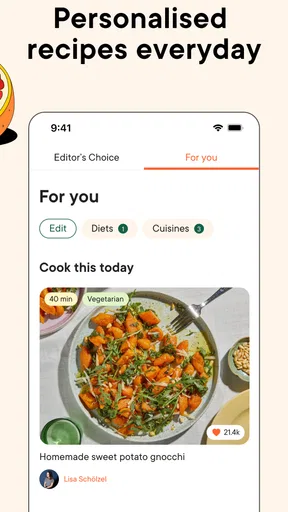
- Personalized recipe recommendations.
- Offline access available for convenience.
Cons
- Limited nutritional information provided.
- Some features require in-app purchases.
- Occasional app crashes reported by users.
- No option for meal planning integration.
- Ads can interrupt the browsing experience.
FAQs for Kitchen Stories: Recipes
What features does Kitchen Stories: Recipes offer to users?
Kitchen Stories: Recipes provides a wide array of features designed to enhance your cooking experience. The app includes step-by-step photo and video guides, a diverse range of international recipes, and the ability to create personalized shopping lists. Additionally, users can upload their own recipes and share cooking tips with the community.
Is Kitchen Stories: Recipes free to use, or does it require a subscription?
Kitchen Stories: Recipes is free to download and use. It offers a substantial amount of content at no cost. However, there are premium features and exclusive content available through in-app purchases for users who wish to access more advanced options and specialized recipes.
How user-friendly is Kitchen Stories: Recipes for beginners?
The app is designed with beginners in mind, offering easy-to-follow instructions with detailed photos and videos. Each recipe is broken down into manageable steps, and there are tips and tricks to help novices improve their cooking skills. The interface is intuitive, making it accessible for users of all skill levels.
Does Kitchen Stories: Recipes support dietary preferences or restrictions?
Yes, Kitchen Stories: Recipes caters to various dietary needs. Users can filter recipes based on dietary preferences such as vegetarian, vegan, gluten-free, and more. This feature ensures that users can easily find dishes that align with their specific dietary requirements or lifestyle choices.
Can I access Kitchen Stories: Recipes offline?
While Kitchen Stories: Recipes primarily relies on an internet connection for accessing its full library and community features, users can save specific recipes to their device. This allows for offline access, making it convenient to cook without needing an active internet connection.


